
For brands
Closeta helps apparel brands that sell across borders show shoppers how a piece looks on them before they order, so fewer parcels come back.
Updated 7 November 2026
Who it is for
Apparel sellers shipping to overseas customers, including Shopify and other independent stores with their own product photos.
Your shoppers see an English interface. Onboarding and support are available in Chinese.
Built for detailed styles
We focus first on J-fashion, hanfu and Gothic pieces: lace, embroidery, layers and color that are hard to judge from a flat-lay photo and often come back as “not what I expected”.
Before a product goes live, we send you sample try-ons from your own photos to approve. Products we cannot render faithfully stay off, so the preview never oversells the real garment.
How a pilot works
1. Sign in to the brand dashboard with your email and register your Shopify store. You get the install code and your stats link right away. Once we review the store (usually within one business day), try-on goes live with no waiting on us to change any settings.
2. In the Shopify theme editor, add a Custom Liquid block to your product page and paste the snippet. A “Try it on” button appears on the page. There is no app to install and no store admin access to grant, and deleting the block removes it. When a shopper switches color or style, the button uses that variant’s image. Not on Shopify? Link to the try-on page from your product page instead.
3. Pilot try-ons come out of your store’s monthly allowance, not the shopper’s own free credits. We count button clicks, try-ons started, try-ons completed and add-to-cart after a try-on, per product. These are counts only, with no shopper identity or photos. Orders from shoppers who tried on carry a closeta_tryon=yes attribute, so you can filter them in your order export and compare their return rate with other orders.
4. You decide whether to continue, and on what terms, once the numbers are in. A small number of free pilots are open now.
Add the button to Shopify
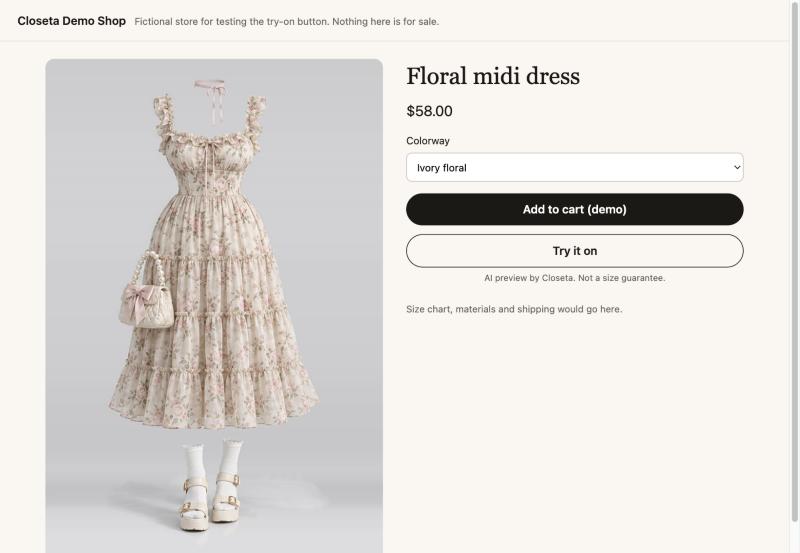
Once your store is set up, your product pages get a “Try it on” button. Shoppers try on that exact product without leaving your store to look for it.
- In Shopify admin, go to Online Store → Themes → Customize and open the product template.
- In the product information section, add a Custom Liquid block and drag it below “Add to cart”.
- Paste the code below, replace your-store-id with the store id we give you, and save.
<script src="https://closeta.io/embed.js" defer
  data-store="your-store-id"
  data-product="{{ product.handle }}"
  data-image="{{ product.selected_or_first_available_variant.featured_image | default: product.featured_image | image_url: width: 1200 }}"></script>
The button and modal can use your brand colours: pick them in the brand dashboard and the code includes them. No app to install and no store admin access to grant. To remove the button, delete the block. Your store id has to be set up by us first; until then the button shows that the product can’t be tried on yet.
The demo store is fictional. Switch the colorway, then click the button: the try-on page uses that variant’s image.
Photos and compliance
A shopper’s portrait is used only to create that one try-on. Closeta does not save it to a database or add it to any public gallery. The result goes back to the shopper’s own browser.
Shoppers confirm they are 18 or older and that the photo is of them. Shared images carry an “AI-generated” label. Images pass a Google Cloud Vision safety check, and explicit or suggestive content is not generated.
A try-on is a styling preview, not a size or fit guarantee, and the try-on page tells shoppers so.
Contact
Email support@closeta.io with your store link, main categories and rough monthly orders.